
SnapSheets – Free Revit Batch Export
Batch export Revit sheets and views to PDF, DWG, DXF, DGN, IFC, NWC, FBX, glTF, OBJ and images in one run. Pick the sheets, tick the formats and let SnapSheets name and save every file.
How it works
Batch Export Revit Sheets in 3 Steps
The same three tabs you see in the plugin: choose what to export, how to export it and where to save it.
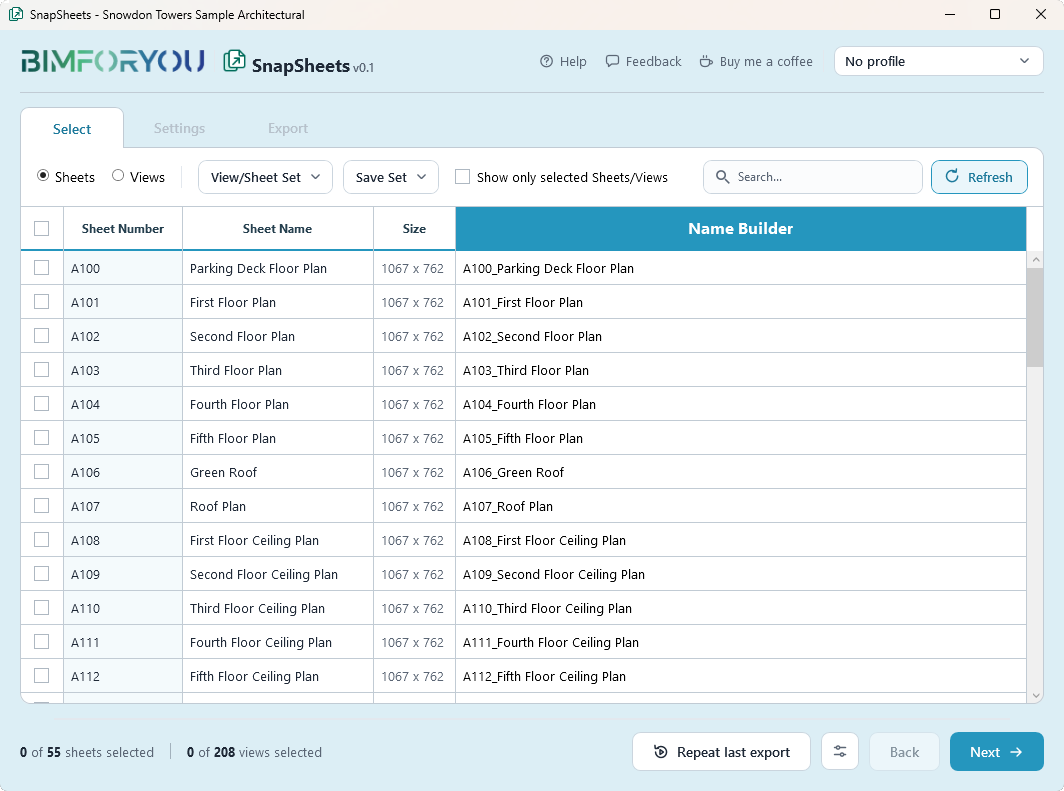
Select sheets and views
Choose sheets and views in one list, search them or pick a saved set. One click selects everything that changed since your last export.
- Sheets and views in the same export
- Saved sets and “Changed since last export”
- Paper size read from the title block
- Name Builder: file names from Revit parameters, with a live preview
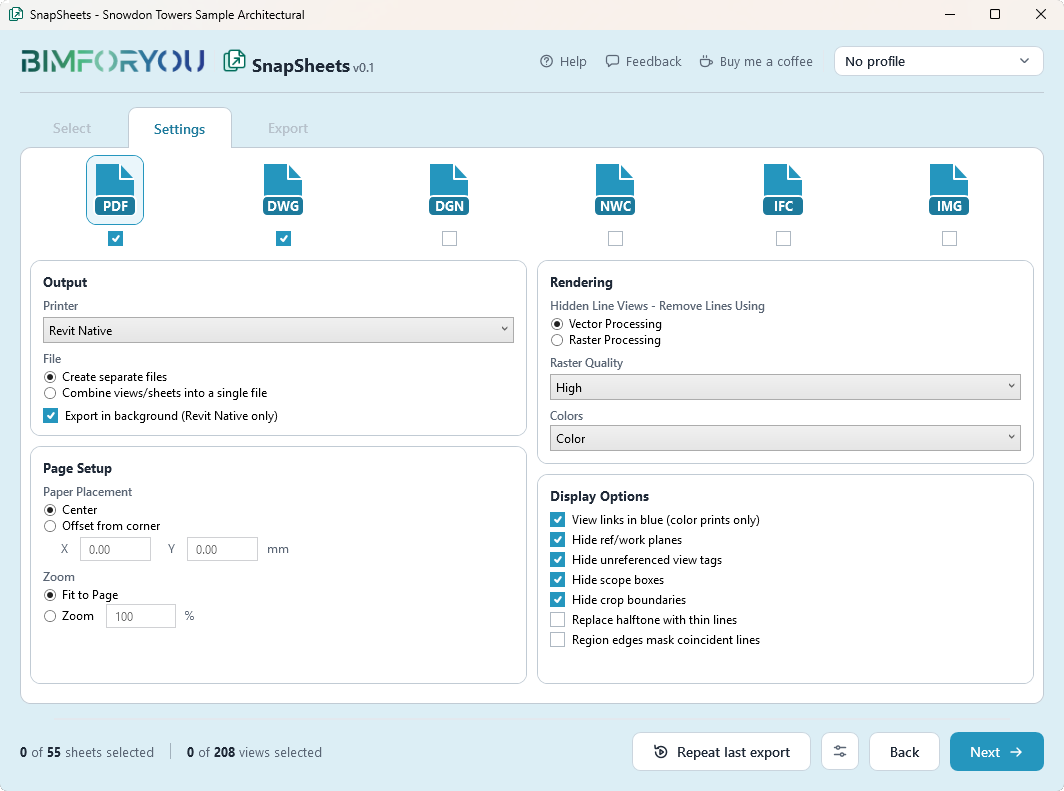
Tick every format you need
Tick several formats at once. Each one uses the same options as Revit’s own export dialog, so your DWG setups, IFC options and PDF settings work as you know them.
- PDF, DWG, DXF, DGN, IFC, NWC, FBX, glTF, OBJ and images in one run
- Your project’s DWG, DXF and DGN export setups
- One combined PDF or a file per sheet
- Save the whole setup as a profile and reuse it
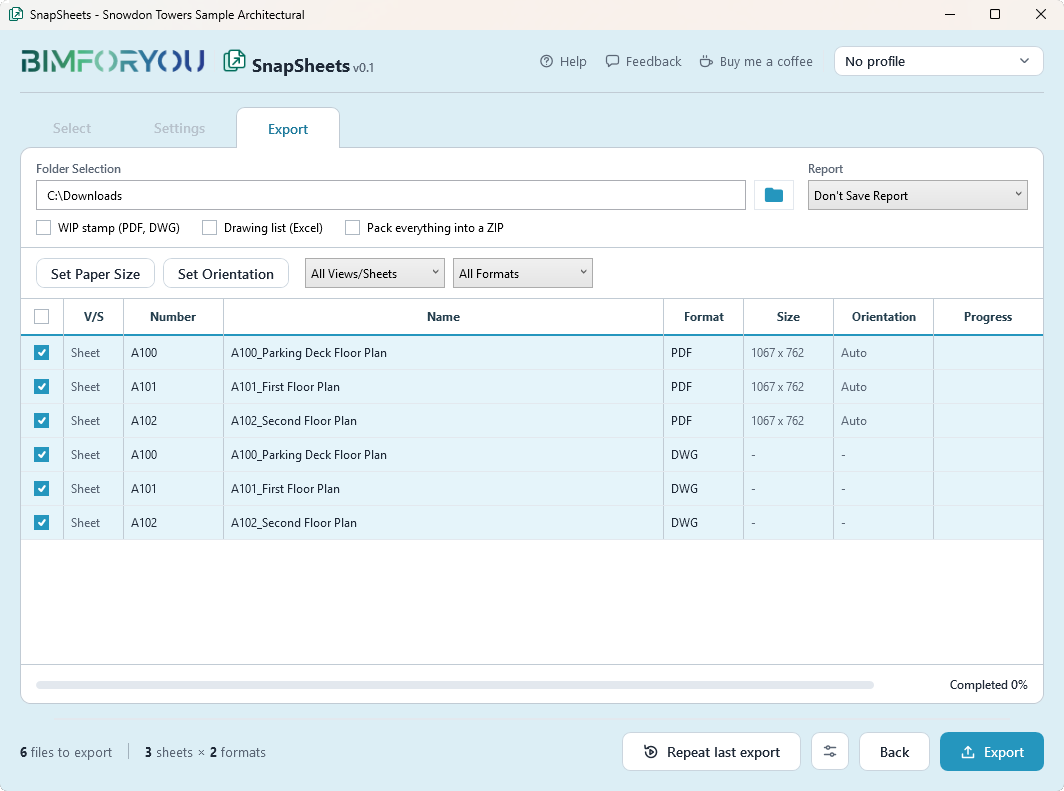
Check and export
Pick a folder and SnapSheets checks the files before it starts: names that already exist, files open in another program, duplicates and paths that are too long. Then it exports everything and shows the progress of each file.
- Paper size and orientation per sheet
- WIP stamp, drawing list in Excel, ZIP package
- Stop at any time, open the folder when it’s done
- Repeat last export with one click
Formats
Export to Every Format You Need
Ten file types, one list of sheets. SnapSheets drives Revit’s own exporters, so the files look exactly like a manual export.
Features
Features That Save Hours
Small things that add up when you issue drawings every week.
Name Builder
Build file names from any sheet or view parameter, with prefix, suffix and separator. Edit the preview and every name updates.
Sets and quick select
Save the sheets you export often as a set, or select only what changed since the last export.
Paper size detection
Reads the real sheet size from the title block and maps it to ISO, ARCH or ANSI. Override it per sheet when you need to.
Export check
Warns about files that already exist, files open in another program, duplicate names and paths that are too long.
WIP stamp
Puts a clear “WIP” mark with date and time on PDF and DWG output, then removes it from the model again.
Drawing list and ZIP
Create a drawing list in Excel with numbers, names, sizes and formats, and pack everything into one ZIP.
Profiles
Save the whole setup under a name, use it in any project and share it as a .json file.
Repeat last export
Run the same export again in one click, with the same sheets, formats and folder.
Export reports
Save a report of every exported file in Excel or CSV, so you know exactly what was sent.
Revit plugin free download
Download SnapSheets for Free
No account and no licence key. Fill in three short fields, the download starts right away and we email you the link too.
Install in five steps
- Windows 10/11
- Revit 2019–2027
- Small installer
- No admin rights
- Run the installerOpen the SnapSheets file you just downloaded.
- Allow it in WindowsThe installer is new and not code-signed yet, so Windows may warn you.
Windows protected your PCClick More info → Run anyway
- Pick your Revit versionsAny of 2019–2027. No admin rights are needed.
- Start Revit → Always LoadRevit asks once about the new add-in.
- Open SnapSheetsBimforyou tab → Export → SnapSheets.
FAQ
SnapSheets Questions
How do I batch export Revit sheets?
Open SnapSheets on the Bimforyou tab, tick the sheets and views you need, choose the formats in Settings, pick a folder and click Export. SnapSheets exports every sheet in every format in one run and names the files from your Revit parameters.
Can I export multiple sheets to PDF and DWG at once?
Yes. Tick PDF and DWG together and SnapSheets exports the same sheets in both formats. For example, 20 sheets in two formats give you 40 files from one export.
Who is SnapSheets for?
Architects, engineers, BIM coordinators and technicians who issue drawings from Revit: drawing sets for clients and tenders, DWG files for consultants, IFC for coordination and NWC for clash detection in Navisworks.
Is SnapSheets really free?
Yes. SnapSheets is free, including for commercial work. There is no account, no licence key and no subscription. If you’d like to support development, you can buy us a coffee.
Is there an export limit?
No. Export as many sheets, views and formats as you need. There is no monthly cap.
Which Revit versions are supported?
Autodesk Revit 2019 to 2027 on Windows 10 and 11, with one installer for all versions. If something doesn’t work in your version, please send us feedback.
Can I export multiple sheets into one PDF?
Yes. In Settings, choose “Combine views/sheets into a single file”. Or keep “Create separate files” to get one PDF per sheet.
Can I export several formats at once?
Yes. Tick several formats in Settings and SnapSheets exports the same sheets and views in each of them. The Export step shows how many files you get, for example 3 sheets × 2 formats = 6 files.
Do I need PDF24 or another PDF printer?
Not in Revit 2022 and newer, which have a native PDF exporter. Revit 2019–2021 need a PDF printer such as PDF24, and the installer can open its download page for you. You can also print through a PDF printer in any version if you prefer.
Why do I need the Navisworks exporter for NWC?
Revit can only export NWC files when the Navisworks NWC exporter from Autodesk is installed. SnapSheets uses that exporter, so install it first if you need NWC.
Can I export a Revit model with textures to Blender or 3ds Max?
Yes. The 3D option exports the active 3D view or the entire model, including linked models, as glTF (.glb) with the textures inside the file or as OBJ with a texture folder. Blender opens both without extra settings. 3ds Max opens OBJ directly and glTF with the free Khronos glTF plugin.
Does SnapSheets change my Revit model?
No. The WIP stamp is removed after the export, and when you print through a PDF printer the print settings are restored, so your project stays as it was.
Is it safe to install?
Yes. The installer only copies the plugin into your Revit add-ins folder and the plugin sends no data. Because the installer isn’t code-signed yet, Windows may show “Windows protected your PC” – click More info → Run anyway.
How do I uninstall SnapSheets?
Open Windows Settings → Apps, find “Bimforyou SnapSheets” and uninstall it, or run the installer again. Your profiles and sets are kept unless you choose to remove them.
Ready to Export Your Sheets?
Download SnapSheets, run your first batch export and tell us what to improve.