
How to Export PDF from Revit: Many Sheets at Once
Want to export Revit sheets to PDF without printing them one by one? This guide shows how to export PDF from Revit in one run: tick the sheets, choose one combined PDF or a file per sheet, and let the free SnapSheets plugin name and save every file. It follows the video on this page, recorded in Revit 2026.
Watch on YouTube · 3:38 min · Revit 2026 · Updated Nov 2026
Guide
Export Revit Sheets to PDF, Step by Step
Six steps from the open model to finished PDF files.
Before you start
- Revit 2019–2027 with your project open. Revit 2022 and newer export PDF with Revit’s own PDF exporter; in Revit 2019–2021 SnapSheets prints through a PDF printer such as PDF24.
- The free SnapSheets plugin. Download SnapSheets and run the installer – no admin rights are needed.
- The sheets you want to export, ready in your model.
- Open SnapSheets
Start Revit, open your project and click SnapSheets on the Bimforyou tab (Export panel). The plugin opens in the Select step with a list of all sheets and views in the model.
- Select the sheets
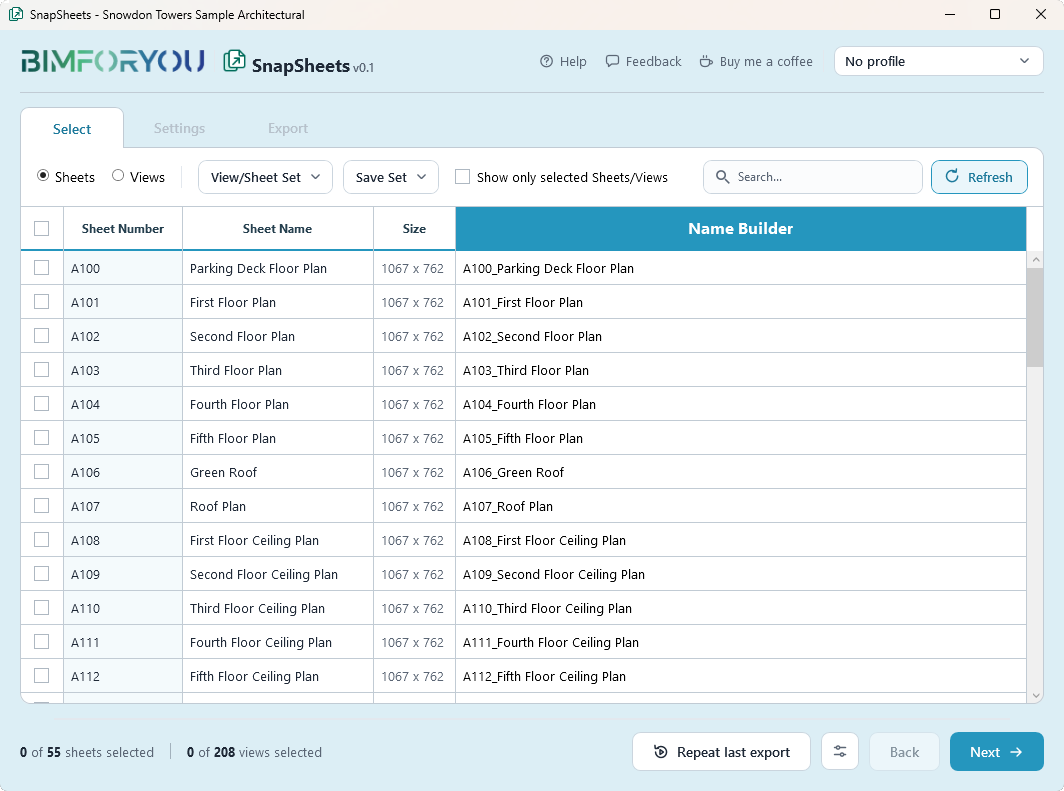
Tick the sheets you need. Use the search field to find sheets by number or name, switch on Show only selected Sheets/Views to check your choice, and save the selection as a View/Sheet Set so you can reuse it next time.
- Build the file names
Open the Name Builder and compose the file name from Revit parameters, for example sheet number and sheet name. The name column in the list shows the result for every sheet before you export.
- Choose PDF and its options
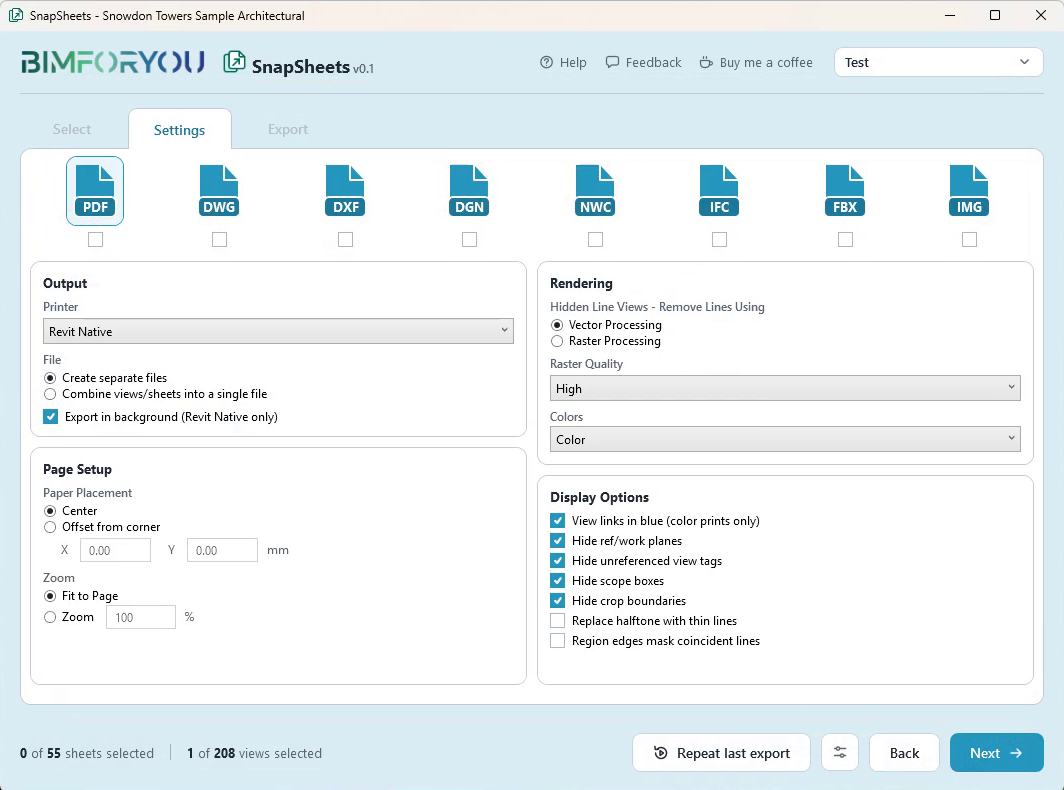
Switch to the Settings step and tick PDF. Choose Create separate files for one PDF per sheet or Combine views/sheets into a single file for one multi-page PDF. Then pick the rendering, the colour mode and the display options.
- Pick the folder and the extras
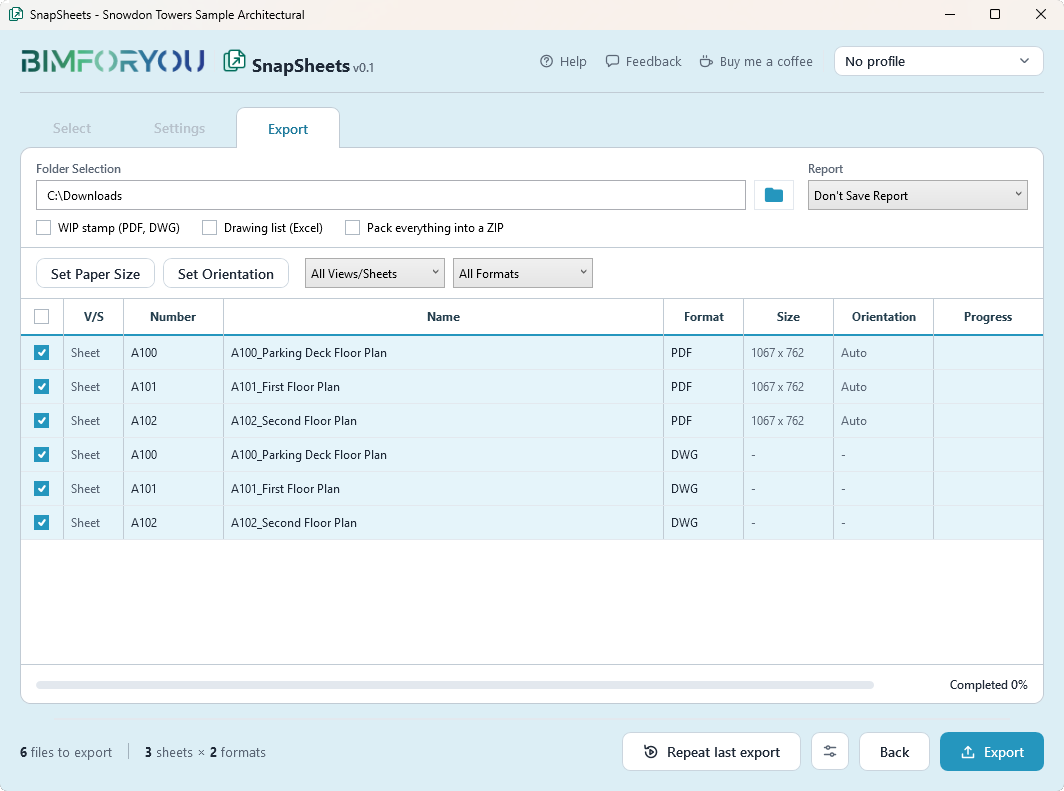
In the Export step choose the output folder. If you need them, set the paper size and orientation, add a WIP stamp, save a drawing list to Excel or pack everything into a ZIP.
- Export and check the result
Click Export. The list shows the progress of every file. Open the folder to check the PDFs. Repeat last export runs the same export again with one click.
How to save Revit sheets as PDF with the file names you want
File names decide how easy a drawing set is to handle. In the Name Builder you compose the name from Revit parameters, for example the sheet number followed by the sheet name. Every sheet in the list shows its final file name before you export, so you can correct a name before any PDF is written.
One combined PDF or a file per sheet
Choose Create separate files when every sheet goes to a different person or when you upload sheets one by one. Choose Combine views/sheets into a single file for a drawing set that opens as one multi-page PDF. If you also need the drawings as CAD files, you can export several formats at once.
Why isn’t Revit exporting to PDF?
If a PDF export does not start or the result is not what you expected, check these points first:
- Is PDF ticked? The sheet must be ticked in the Select step and PDF must be ticked in Settings.
- Which Revit version? Revit 2019–2021 have no native PDF export, so a PDF printer such as PDF24 must be installed and selected as the printer.
- Is the folder valid? Pick a folder you can write to. SnapSheets warns you before it overwrites files that already exist.
- Is the old PDF still open? A PDF that is open in a viewer can block a new file with the same name. Close it and export again.
- Is the paper size right? Set it in the Export step if sheets come out in an unexpected size.
How can I convert an RVT file to PDF?
Open the .rvt model in Revit and follow the steps above. The drawings exist only inside the model, so a Revit file cannot be turned into PDF sheets without Revit. If you work on several projects, save your export setup as a profile and load it in each of them.
SnapSheets
What SnapSheets Adds
The tools around the export that save time when you issue a whole drawing set.
FAQ
Questions and Answers
How do I export all Revit sheets to PDF at once?
Open SnapSheets, tick the checkbox in the list header to select every listed sheet, tick PDF in Settings, choose a folder and click Export. You can also save your selection as a set and load it with one click next time.
Can I combine several sheets into a single PDF?
Yes. In the PDF settings choose Combine views/sheets into a single file. Keep Create separate files to get one PDF per sheet.
How do I name the PDF files from the sheet number and name?
Use the Name Builder in the Select step. Add the Revit parameters you want, such as sheet number and sheet name, in the order you need.
Why does my PDF have a different paper size than expected?
Set the paper size in the Export step with Set Paper Size. Without it, sheets are exported in their own size and views use A3.
Do I need PDF24 or another PDF printer?
Not in Revit 2022 and newer, which have a native PDF exporter. Revit 2019–2021 need a PDF printer such as PDF24, and the SnapSheets installer can open its download page for you.
How do I export as a PDF in Revit?
Open SnapSheets on the Bimforyou tab, tick the sheets, tick PDF in Settings, choose a folder and click Export. SnapSheets uses Revit’s own PDF exporter, so you get the same PDF as from Revit’s export dialog, for many sheets at once.
How do I save Revit sheets as PDF with custom file names?
Compose the name in the Name Builder from Revit parameters such as sheet number and sheet name. The list shows the result for every sheet before you export.
Is SnapSheets free?
Yes, including for commercial work. There is no account, no licence key and no export limit.
More guides
More Revit Export Guides
How to Export Revit 3D Views to FBX
One FBX file per 3D view, with level of detail options.
Read guide →How to Export Revit to Blender with Textures
One glTF file with the textures inside, ready for Blender.
Read guide →How to Export Revit to 3ds Max with Textures
OBJ with a texture folder and bump maps set up for 3ds Max.
Read guide →How to Export Revit Views and Sheets to Images
Set the pixel size and image quality for many sheets at once.
Read guide →Revit Export Formats: PDF, DWG and More at Once
Export the same sheets as PDF, DWG and DXF in one run.
Read guide →How to Export Revit to DWG (AutoCAD)
Use your DWG export setups and keep linked models as external references.
Read guide →How to Export Revit to IFC: Settings Explained
Choose the IFC version, the property sets and the level of detail.
Read guide →How to Export Revit to Navisworks (NWC)
Export 3D views or the whole project to NWC for Navisworks.
Read guide →
SnapSheets: Free Revit Batch Export Plugin
All features, every export format and the free download in one place.
About SnapSheets →